Food Truck Window Setup: Mounts and Customer-Facing Screens
Pick the right food truck POS mount: reader height, swivel stands, sun glare and theft fixes so customers tap and tip without passing devices back.
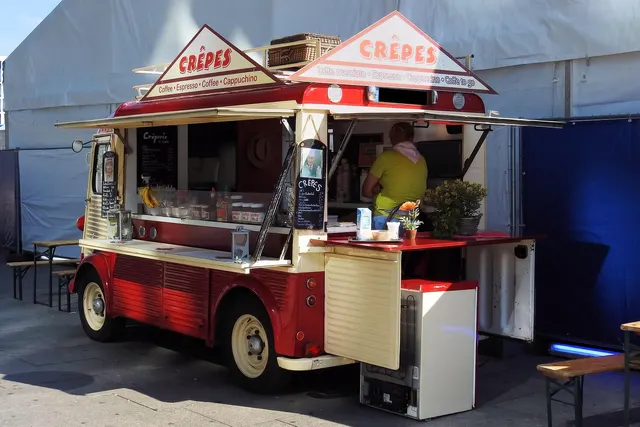
Photo: Pixabay
On this page 6 sections
- Fixed Food Truck POS Mount, Swivel Stand, or Handheld
- Reader Height and Reach for Customers Standing on the Ground
- Beating Food Truck Screen Sun Glare on Tip Prompts
- Card Reader Mount Security: Theft at the Window and Drops on the Road
- Cable Routing and Power at the Window
- Window Layouts for One-Person vs. Two-Person Service
Key takeaways
- Before buying a mount, measure pavement-to-sill height, ledge depth and which way the window faces at your two busiest stops.
- Test the mounted screen with a tall person, a short person and someone seated before you drill.
- Treat mounts as parking-only hardware. Pull or lock down the device before the truck moves, and check swivel tension weekly.
- Keep a charged, paired handheld as a backup so a failed mounted unit doesn't shut down the line.
The right food truck POS mount puts the payment screen where a customer standing on the pavement can read it, tap a card and choose a tip without anyone inside the truck handing a device out the window. For most trucks, that means a swivel stand or arm at the service window, a tether or locking base, and a plan for glare and for the drive home. Each handoff costs a few seconds and adds a chance someone drops the device. A well-planned window removes both.
The layout choices below assume you already have a POS and card reader you like. If you're still choosing, start with our guide to the best food truck POS system for a moving kitchen, then come back to the window.
Fixed Food Truck POS Mount, Swivel Stand, or Handheld
There are three common ways to get a payment screen in front of a customer, and each fails in a different way.
| Setup | Works best when | Main weakness |
|---|---|---|
| Fixed outward-facing mount (a second screen or PIN pad facing the customer) | One person takes orders on a merchant screen while the customer pays on their own device | Takes up sill space and is the most exposed to sun and grab-and-run theft |
| Swivel stand or arm (one screen that turns toward the customer) | One-person windows and trucks with a single tablet-style POS | Staff must spin it back after every sale; cheap swivels loosen with road vibration |
| Handheld passed through the window | Small menus, low volume, or as a backup | Slowest option, and the most likely to be dropped or carried off |
A swivel stand is the default for a reason. It costs less than a two-screen setup and keeps one device to maintain. It also gives the customer control of the tap and the tip prompt. A fixed customer-facing display pays off once your line regularly backs up, because the order-taker can start the next ticket while the current customer finishes paying.
Handhelds still have a place. They work as a backup if the main unit fails, and they're useful for a second person working the line during a rush. Our comparison of countertop, wireless and mobile card readers explains the tradeoffs in connectivity and battery life.
What passing devices costs you (illustrative): Assume each handoff out and back adds 8 seconds to a transaction, and your truck runs 150 card sales on a busy day. That's 150 × 8 = 1,200 seconds, or 20 minutes of window time spent handing hardware back and forth. Your numbers will differ. Time a few handoffs on your next shift and multiply by your daily card count to see whether a mount pays for itself in throughput.
Reader Height and Reach for Customers Standing on the Ground
Food truck service windows usually sit well above the pavement, so customers end up reaching up to a sill they can barely see over. A screen that looks perfect from inside the truck can be close to unreadable from the ground. The tip buttons may also sit at an angle where a shorter customer can't see them at all.
There are a few ways to bring the screen down to the customer:
- An articulating arm that reaches past the sill and drops the screen below the window line.
- A fold-down exterior shelf with the mount bolted to it, so the device sits closer to the customer's chest height.
- A tilting head that angles the screen downward toward the customer instead of straight out.
Before you drill anything, run a simple test. Park on level ground and hold the device where you plan to mount it. Then have three people try to tap and tip from outside: someone tall, someone short, and someone seated in a chair to stand in for a wheelchair user. If any of them has to stretch, squint or step onto the curb, move the device.
Accessibility can matter here beyond convenience. Accessibility rules may apply to how customers reach your payment device, and how they apply to a mobile unit depends on your jurisdiction. Ask your local licensing office or an accessibility professional what applies to your truck. This section is general information, not legal advice.
Keep the customer's hands out of your prep zone, too. If tapping a card means reaching into the window over a hot line or the pickup shelf, the reader is in the wrong spot.
Beating Food Truck Screen Sun Glare on Tip Prompts
Glare is a common cause of failed taps and skipped tip screens at truck windows. When a customer can't read the amount, they hesitate, ask staff for help, or skip the tip prompt entirely. If you ask for tips, the prompt has to be readable. Our piece on whether food trucks should use tip screens covers the decision itself.
Start with where you park. Note which side your window faces at your regular lunch and dinner stops, and where the sun sits during those hours. When you have a choice of parking spot, angle the truck so the window isn't facing straight into the afternoon sun. When you don't, a mount with tilt adjustment lets you aim the screen away from the brightest part of the sky.
After that, add physical shade:
- The awning helps most when it extends far enough to put the device in shadow, not just the people in line.
- A screen hood (a three-sided visor that clips around the device) blocks side glare cheaply. Check that it doesn't cover the contactless tap area or the card slot.
- A matte anti-glare film cuts reflections. Test touch accuracy after you apply it, because thick films can make small tip buttons harder to hit.
On the software side, turn screen brightness up during daylight service and remember that it drains handheld batteries faster. If your POS lets you customize the tip screen, use fewer, larger buttons with high contrast.
Direct sun also heats the device. Screens and batteries left in full sun can overheat and shut down mid-shift. Our guide to keeping food truck card readers working through heat, grease and dead batteries has the details.
Card Reader Mount Security: Theft at the Window and Drops on the Road
A device sitting on an exterior shelf during a rush is easy to snatch. Mount it so that only the screen and tap area reach the customer. Anchor the base inside the sill, and add a tether or coiled security cable so a grab-and-run ends at arm's length. Locking stands that need a key or tool to remove the device add another layer, as long as staff can still pull it quickly at closing.
Tampering is the quieter risk. Card security standards expect merchants to protect payment devices from tampering, so ask your processor what its PCI program requires of you. Build a quick check into your opening routine either way. Confirm the serial number matches your records, look for overlays on the card slot or keypad, and check for loose seams or extra cables. A PIN pad mounted where people in line can see the keypad is also a problem, so angle it so the customer's body blocks the view.
Driving shakes everything loose. Swivel joints and clamp mounts that feel solid in a parked truck can work loose over potholes. Before you set off:
- Pull the device off a quick-release mount, or confirm the mount is rated to hold it in a moving vehicle.
- Store it in a padded bin or drawer that latches, away from the grill and the fryer.
- Check mount bolts and swivel tension weekly, not just when something wobbles.
Don't leave payment hardware in a locked truck overnight in summer heat or winter cold. Take it inside with the cash bank. Our guide to food truck cash handling and theft covers the closing routine for both.
Cable Routing and Power at the Window
Cables at the service window catch elbows, sleeves and spatulas. Run power and data lines along the interior wall in adhesive or screw-in clips, then bring them up to the mount through a grommet rather than over the sill edge. Leave a small drip loop (a dip in the cable below the connection point) so grease or rainwater runs off before reaching the port. Keep every cable clear of the fryer, flat-top and sink.
Power the window from a stable outlet. Whether that's an inverter off the truck's electrical system or your generator circuit, put a surge protector between it and the payment hardware, and don't share that outlet with high-draw equipment that cycles on and off. Give handhelds a charging dock inside the truck so they go back on power between rushes. Keep a spare charging cable on board too. Cables wear out, and a spare costs far less than a dead reader during the dinner rush.
Place your router or hotspot where the truck's metal body won't block the signal to the reader. Even with good signal, cell coverage drops at some stops. Know your terminal's offline mode before you need it. Our article on offline card payments on a food truck explains the limits that keep declines from turning into losses.
Window Layouts for One-Person vs. Two-Person Service
One person at the window. Mount the POS on a swivel stand at the side of the window closest to the kitchen, so you can turn from taking the order to plating without crossing the opening. Enter the order, rotate the screen out for tap and tip, then rotate it back. Mark the "home" position on the sill so the stand ends up in the same place each time.
Two people at the window. Split the jobs. The order-taker works a merchant screen facing inward. The customer pays on a fixed outward-facing display or PIN pad on the order side of the window. Pickup happens at a second window, or at the far end of the same one, so people waiting for food don't crowd the people paying. During a rush, the second person can walk the line with a handheld and take orders and payments before customers reach the window. Our guide to speeding up a food truck line at the payment window covers the order flow in more detail.
Whichever layout you run, keep a backup handheld charged and paired. If the mounted unit fails, you switch devices in a minute instead of turning the line away.
Before you buy a mount, measure three things on a level lot: the height from pavement to sill, the depth of your window ledge, and the direction the window faces at your two busiest stops. Bring those numbers when you compare MannyPay's POS systems for food trucks, customer-facing PIN pads and handheld terminals for line-busting. Then request a free quote, and a MannyPay specialist will respond within one business day.
This article is for general educational purposes and is not legal, tax or financial advice. Card network rules and state laws change; confirm current requirements for your business.