ID Scanners and Thumbprint Capture for Pawn Transactions
How to choose a pawn shop ID scanner, thumbprint pad and camera setup that meets reporting rules and gives you evidence when a card dispute hits.
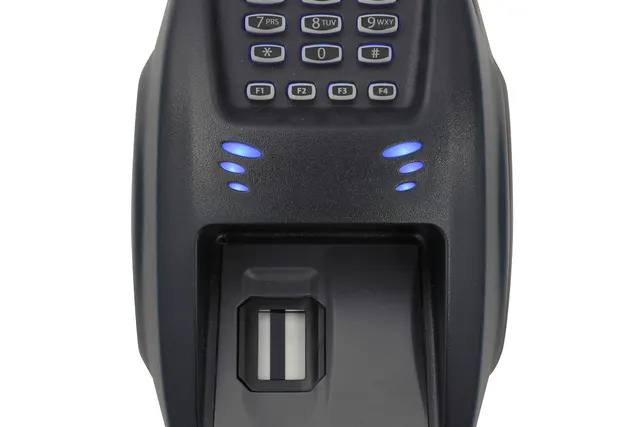
Photo: Pixabay
On this page 7 sections
- What Secondhand Dealer ID Requirements Usually Cover
- Pawn Shop ID Scanner Options: Barcode Readers vs. Full-Image Scanners
- Pawn Shop Thumbprint Pads and Item Photo Stations
- Integrating Capture Hardware With Pawn Software
- Using ID Data to Defend Card Disputes
- Storing Customer Data Securely
- Pricing the Setup Against Your Card Program
Key takeaways
- Read your state law and your city or county ordinance together. The stricter one usually decides what a ticket must capture.
- A barcode ID scanner fills in ticket fields and cuts typos. An image scanner also stores a photo of the ID, which helps more when you later need evidence.
- An ID scan does not replace a chip or tap read on a card sale. It adds to the record, and it helps most when the person disputing the charge is the person who was at your counter.
- Save the card authorization details on the pawn ticket, and keep camera footage longer than your system's default. A dispute can arrive months after the sale.
A pawn shop ID scanner, a digital thumbprint reader and an item photo station each do two jobs. They capture the seller and pledgor details that pawn and secondhand dealer laws require, and they build the record you'll need when a card payment at your counter is disputed. Most shops end up with the same setup: an ID scanner that reads both the barcode and the card image, a single-finger digital print reader, a counter camera, and a photo station for items. All of it should write directly into your pawn software. What your jurisdiction actually requires depends on your state law and your city or county ordinance, so check both before you buy anything.
What Secondhand Dealer ID Requirements Usually Cover
States regulate pawn and buy transactions, and many cities and counties add their own ordinances on top. The details vary a lot, but the requirements usually fall into the same few areas:
- Identity: a government-issued photo ID, with the name, address, date of birth, ID number and a physical description recorded on the ticket.
- Prints: in some jurisdictions, a thumbprint or index fingerprint on the pawn or purchase record. Some still accept ink, and others expect digital capture.
- Item detail: a description with serial numbers, model numbers, engravings and markings. Some places also require a photograph.
- Reporting: transaction data sent to local law enforcement on a set schedule. In many areas this goes electronically through a reporting platform the police department uses.
- Holding: a period during which you can't sell or melt the item. Our guide to pawn shop holding periods by state covers this part.
A common mistake is reading only the state statute. A shop can meet its state's ID rules exactly and still miss a city ordinance that adds a print requirement or a photo of the seller. Pull both documents. Ask your local police department's pawn detail what report format it expects, and confirm your reading with an attorney who knows secondhand dealer law in your area. Gold buyers and shops that buy precious metals in volume should also ask whether federal anti-money-laundering obligations apply to them. That question belongs with counsel, not with your hardware vendor.
Pawn Shop ID Scanner Options: Barcode Readers vs. Full-Image Scanners
Most U.S. driver's licenses and state IDs carry a two-dimensional PDF417 barcode on the back. It encodes the same fields printed on the front. A barcode reader decodes it, and your pawn software drops the fields straight onto the ticket. You can choose among three levels of capture.
| Capture method | What you get | Where it falls short |
|---|---|---|
| Manual entry | Nothing extra to buy | Typos, transposed ID numbers, slow at busy times, no image of the ID |
| Barcode-only reader | Fast, accurate field capture | No picture of the card, and it can't read IDs without a barcode, such as some foreign passports |
| Full-image (duplex) scanner | Front and back images plus decoded fields, often with OCR for passports | Costs more, takes counter space, and depends on drivers for your software |
Manual entry is a common source of reporting errors. One wrong digit in an ID number can make a police report useless, and you'll be the one explaining it. A barcode reader fixes accuracy at low cost, so treat it as the minimum worth buying.
For most pawn counters, the full-image scanner is the better choice. When a buyer or the police question a transaction, a stored image of the ID with the photo and physical description is far more useful than a row of decoded text. If your customers include tourists or recent arrivals who present passports or consular IDs, image capture with OCR is the only way to avoid typing those by hand.
Before you buy, ask your pawn software vendor which scanner models it supports. A scanner your software can't talk to is just an expensive photocopier.
Pawn Shop Thumbprint Pads and Item Photo Stations
Where a print is required, a digital single-finger reader replaces the ink pad. The image is cleaner, nothing smudges on the paper ticket, and the print file attaches to the electronic record that goes to law enforcement. Check three things before you buy:
- Your pawn software supports the reader.
- The reporting system in your area accepts its image quality.
- It is sturdy enough for hundreds of greasy thumbs a week.
Some readers also run a live-finger check, which discourages people from presenting a fake print or a photo of one.
Item photos are the other half of the record. A small lightbox with a fixed camera produces consistent images of rings, watches and phones, and the software links each image to the item line on the ticket. Good photos settle arguments over condition and help police match property to theft reports. They can also serve as listing photos if you sell the item later. If you plan to move inventory online, our article on selling pawn inventory online covers the payment and shipping risks that come with it.
Where a Pawn Shop Camera System Fits
Some ordinances require video of the counter or a photo of the person transacting. Even where nothing requires it, a pawn shop camera system aimed at the customer side of the counter and at the payment terminal gives you strong fraud evidence. Two settings matter more than resolution:
- Retention: many recorders overwrite footage after a few weeks by default. Card disputes can arrive months after the sale, so set retention to the longest period you can afford. Another option is to export and save a clip for every card sale above a dollar amount you choose.
- Clock sync: the recorder's clock should match your terminal and your pawn software. A clip stamped 2:14 p.m. that matches a receipt stamped 2:14 p.m. is persuasive. One that is 40 minutes off is not.
Integrating Capture Hardware With Pawn Software
Aim for one record per transaction that holds the ID, the print, the item photos, the reporting submission and the payment. If those pieces are scattered across a scanner's local folder, a camera DVR and a paper ticket, they won't come together when you need them.
Integration usually works like this. The ID scanner, print reader and photo camera connect over USB to the counter PC. The pawn software uses each vendor's drivers to pull the captures onto the ticket. The software then formats the reporting file or sends the data to the police department's platform. Our review of the best pawn shop software for loans, reporting and card payments compares how platforms handle this.
Shops leave out the payment side more often than any other piece. With a semi-integrated terminal, the pawn software sends the amount to the card reader and gets the approval back. The authorization code, the last four digits of the card, the entry method (chip, tap, swipe or keyed) and the terminal timestamp can then be saved on the same ticket as the ID and print. That link is what makes the dispute packet in the next section easy to put together.
When you choose smart terminals or a full POS system, confirm with your software vendor that it supports that terminal for semi-integrated payments before you order. Keep the full card number out of the pawn software entirely. The terminal handles card data, and the ticket stores only the reference details.
Using ID Data to Defend Card Disputes
Many merchants misunderstand one point here. An ID scan doesn't protect a card sale the way a chip or tap read does. When a card is read by chip or contactless, network rules generally shift liability for many counterfeit-fraud disputes away from the merchant. When a card is swiped or keyed, you usually carry more of the risk. So your first defense is the terminal: dip or tap every card that supports it, and avoid keying cards at the counter.
ID data helps most in the disputes that chip technology doesn't settle. The common case is a customer who really was at your counter, paid with their own card, and later tells their bank they didn't authorize the charge.
Card network rules also limit when a merchant may make ID a condition of accepting a card. That is a separate question. Pawn law is what requires you to collect ID on pawn and buy transactions. For ordinary retail card sales, ask your processor what you may require before you make ID checks a store policy.
An Illustrative Redemption Dispute
The numbers and dates below are illustrative. They aren't drawn from any real merchant.
- Assumptions: a customer pawns a ring on February 3. Your counter captures a full ID image and a digital thumbprint. On March 2 the same customer redeems the ring with a tapped card, paying $420 in principal and charges. Your software stores the auth code, the last four digits and the entry method on the redemption ticket. Your cameras keep footage for 120 days, and their clocks match the terminal.
- The dispute: in mid-April, the issuer files a fraud dispute stating that the cardholder didn't authorize the $420 charge.
- Your response: the terminal receipt showing a contactless read; the original pawn ticket with the customer's name, ID image and print; the redemption ticket linking the same customer to the same ring, with the payment reference; and a video still, timed to the receipt, showing the customer at the terminal.
Two caveats apply. If you can't tie the name on the card to your customer, the case is weaker, so record any cardholder name your terminal returns. And if the real cardholder never set foot in your store because a thief used a stolen card, your ID record won't win the dispute. It shows a different person. That gives the police a lead but doesn't change who pays. Our article on pawn shop chargebacks from stolen cards buying jewelry and phones covers how to stop those sales before they happen.
Dispute rates cost you more than the money lost on each case. Pawn shops already sit under a merchant category code that processors watch closely (see how MCC 5933 affects your fees and risk). A rising chargeback ratio can lead to reserves, repricing or a closed account.
Storing Customer Data Securely
A pawn counter collects ID images, fingerprints, addresses, dates of birth and photos of customers' property. Identity thieves value that data, and your shop is responsible for protecting it.
- Separate card data from ID data. Card numbers stay in the terminal and with your processor. Never photograph a customer's card for the file or write a full card number on a ticket. Doing either can pull your pawn software into PCI DSS scope.
- Encrypt and limit access. Store captures in your pawn software, not in a shared folder or on the scanner's local drive. Give each employee their own login with access limited to their role, and turn off logins the day someone leaves.
- Set a retention schedule. Keep records as long as your pawn law requires, and longer if an open dispute or police hold calls for it. Then delete them, because data you no longer need only adds risk.
- Check your vendors. Cloud pawn software and cloud camera systems hold your customers' data. Find out how they encrypt it, where they store it, and how quickly they'll tell you about a breach.
- Know your notification duties. State breach notification laws can require you to notify customers, and sometimes regulators, if this data is exposed. Some states also restrict how businesses may use data read from a license barcode.
Pawn lenders can also fall under federal financial privacy and data security rules that apply to consumer lenders. This section is general information, not legal advice. Have a qualified attorney or compliance professional review your setup against your state's law and federal rules.
Pricing the Setup Against Your Card Program
Capture hardware belongs in the same decision as your terminals and your processor. The setup that satisfies your police department should also hand your processor a clean dispute file. If you're still choosing a processor, or you've been turned down before, start with why pawn shop merchant accounts get declined and how to qualify.
MannyPay provides pawn shop payment processing and high-risk merchant accounts, along with Clover, Valor, Dejavoo and PAX terminals. Your first step is a short list: your state and local capture requirements, your pawn software, and the terminals that software supports. Bring that list when you request a free processing quote, and a MannyPay specialist will respond within one business day.
This article is for general educational purposes and is not legal, tax or financial advice. Card network rules and state laws change; confirm current requirements for your business.