How to Store a Customer's Card on File Safely and Legally
Learn how to store a credit card on file safely with tokenization, the right authorization form and consent steps that hold up in disputes.

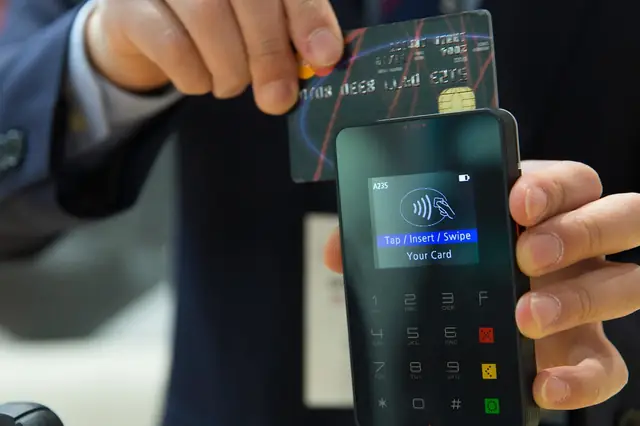
Photo: Pixabay
On this page 8 sections
- Why Writing Down Card Numbers Is a Serious Risk
- How Payment Tokenization and Customer Vaults Work
- Getting a Card on File Authorization Form That Holds Up
- Merchant-Initiated vs. Customer-Initiated Charges
- Using Card on File Payments for Deposits, Balances and No-Shows
- Reducing Disputes on Card-on-File Charges
- Checklist: How to Store a Credit Card on File Safely
- Next Steps
Key takeaways
- Never write down, email or spreadsheet card numbers. A tokenized customer vault lets you charge returning customers without holding card data.
- A clear, signed or clicked authorization that spells out when and why you'll charge the card is your best protection in a dispute.
- Merchant-initiated charges, such as no-show fees, balances and recurring billing, need to be set up and flagged correctly with your gateway.
- Send receipts, use a recognizable descriptor and keep consent records together so you can respond quickly when a cardholder disputes a charge.
If you book appointments, hold reservations or bill clients after the work is done, you've probably wanted to store a credit card on file so you can charge returning customers without asking for their card every time. Done right, card-on-file payments save time for you and your customers. Done wrong, they expose your business to data breaches, compliance problems and chargebacks you can't win. This guide explains how payment tokenization and customer vaults work, what a solid card on file authorization form should include, and the consent and dispute-prevention steps that protect you when a customer later questions a charge.
Why Writing Down Card Numbers Is a Serious Risk
Many small businesses still keep card numbers in places they shouldn't. Common examples include a binder at the front desk, a spreadsheet, a note in the scheduling software or an email thread. It feels convenient, but it creates real exposure:
- Breach liability. If those numbers are stolen, your business may face investigation costs, fines passed through from the card networks, and the loss of your ability to accept cards.
- PCI DSS scope. The Payment Card Industry Data Security Standard governs how card data is handled. Every place a full card number lives, whether paper, inbox or laptop, falls under it. That widens what you have to secure and document.
- Employee access. A written card number can be copied by anyone who sees it, including former staff.
- Weak dispute position. A number on a sticky note proves nothing about whether the customer agreed to a charge.
Treat the card's security code as something you never keep at all, in any form. Ask your processor to confirm the current handling rules for your setup.
If a customer emails or texts you their card number, don't save it. Delete the message, and ask them to use a secure payment link or give the number by phone for direct entry into your gateway.
How Payment Tokenization and Customer Vaults Work
Payment tokenization replaces a card number with a random reference value, called a token. The real card number is stored by your payment gateway or processor in a secure environment. Your business only keeps the token.
A customer vault is the gateway feature that stores these tokens alongside customer profiles. When you need to charge a returning customer, you select their profile and run the charge. The vault sends the token, and the gateway matches it to the real card behind the scenes.
What the Token Can and Can't Do
| Full Card Number | Token in a Customer Vault | |
|---|---|---|
| Can be used to charge the customer through your account | Yes | Yes |
| Useful to a thief who steals it | Yes | Generally no; it only works within your merchant setup |
| Visible to your staff | Often | Typically only the last four digits and card brand |
| Adds to your PCI DSS burden | Significantly | Much less, though you still have compliance responsibilities |
Tokenization reduces risk. It doesn't remove all of your obligations, so you'll still complete your annual PCI DSS validation and follow your processor's security requirements.
Where the Vault Lives
You can access stored cards through several tools, depending on how you take payments:
- Online payment gateways. E-commerce checkouts and invoicing tools save the card during a customer's first purchase. MannyPay works with online payment gateways like Authorize.Net and NMI, and you should confirm which customer profile features are included in the setup you choose.
- Virtual terminals. For phone orders, invoices and balances, a virtual terminal for keyed and card-not-present payments lets staff enter the card once and save it to the vault without writing it down. For a full walkthrough, see what a virtual terminal is and how it works.
- POS and booking software. Many salon, hotel and vet systems can save a card at check-in or booking through an integrated processor.
Getting a Card on File Authorization Form That Holds Up
Storing a token is the technical half. The other half is consent. When a cardholder disputes a charge, the question is usually "Did this person agree to be charged this amount for this reason?" Your authorization record answers it.
What to Include
A strong card on file authorization form, whether paper or digital, covers:
- Customer name and contact details, matching the cardholder where possible.
- Card identification by brand and last four digits only. Avoid recording the full number on the form.
- What the card may be charged for. Examples include no-show fees, remaining balances, recurring monthly fees, incidentals or replenishing a retainer.
- How amounts are determined. List a fixed amount, a maximum or the policy that sets the amount, such as "50% of the booked service price."
- Timing and frequency. Examples include "on the 1st of each month," "within 7 days of service" or "at checkout."
- Notice you'll give before or after charging, such as an emailed receipt or an advance reminder for variable amounts.
- How to cancel or update the authorization.
- Signature or affirmative click, plus the date. For online consent, save the timestamp and the exact terms shown.
Keep the language plain. A policy buried in fine print is harder to defend than a short, specific statement the customer clearly saw.
Collecting Consent Online, in Person and by Phone
- Online: Use an unchecked box the customer must actively tick, next to the terms. Save the checkout record.
- In person: Have the customer sign a digital or paper form. If they tap or insert their card at the same time, that card-present transaction helps tie the card to the person.
- By phone: Read the terms aloud and follow up immediately with a written confirmation email. Our guide to taking credit card payments over the phone covers safe keying practices.
Rules on recurring charges and automatic renewals vary by state. Treat this section as general information, and confirm your terms with an attorney familiar with consumer protection law in your state.
Merchant-Initiated vs. Customer-Initiated Charges
Card-on-file transactions fall into two broad groups, and the card networks expect them to be identified correctly.
| Type | Who Starts It | Examples |
|---|---|---|
| Customer-initiated | The customer, actively choosing to pay | Selecting a saved card at online checkout, approving an invoice payment |
| Merchant-initiated | Your business, under prior authorization | Monthly memberships, no-show fees, final balances, hotel incidentals after checkout |
The first transaction typically establishes the stored credential with the customer's consent. Later merchant-initiated charges reference that original agreement. Your gateway or POS handles the technical flagging, but only if it's configured for the right transaction type. Ask your provider to confirm that your recurring and unscheduled charges are set up as stored-credential transactions rather than ordinary keyed sales.
If you bill on a schedule, it's worth reading up on how to choose recurring billing software that manages tokens, retries and notifications for you.
Using Card on File Payments for Deposits, Balances and No-Shows
Here's how card-on-file payments typically fit the industries that rely on them most.
Salons and Spas
Salons commonly save a card at booking to enforce cancellation and no-show policies, or to take deposits on long or product-heavy services. Illustrative example: a policy might state that clients who cancel with less than 24 hours' notice are charged 50% of the booked service, and the client accepts it when booking online. Post the policy at booking and in confirmation texts. Avoid surprising regulars with a fee they never saw. For deposit-heavy services, see deposits for hair extensions and color correction.
Hotels and Lodging
Hotels typically secure a card at reservation to guarantee the room. They use it again at check-in for an authorization hold covering incidentals, then settle the final folio at checkout. Card networks have specific expectations for guaranteed reservations, no-show charges and amounts that change after checkout, such as a minibar charge discovered later. Make sure your reservation terms and PMS settings match what your processor tells you. Group bookings add another layer, covered in our piece on collecting group room block deposits.
Veterinary Clinics
Vet clinics often save a card for boarding stays, wellness plan installments or balances when final treatment costs aren't known at drop-off. Treatment estimates are useful here. Have the client approve an estimate range and authorize charges up to that range, then get fresh consent if costs will exceed it. Emergency hospitals face added pressure, which our guide to emergency vet deposits before treatment addresses.
Professional Services
Accountants, consultants, attorneys and other firms use stored cards for monthly fees, invoices that auto-pay on approval, or retainers that refill when the balance drops. Put the card authorization in the engagement letter and spell out the replenishment trigger. Attorneys should also confirm trust-account rules with their state bar. Learn more about evergreen retainers that auto-replenish with card on file.
Reducing Disputes on Card-on-File Charges
Most card-on-file disputes come from customers who don't recognize a charge or don't remember agreeing to it. These steps reduce both:
- Use a recognizable billing descriptor. Your business name on the statement should match what customers know you as. Ask your processor how to update it.
- Send a receipt for every charge, including the reason, such as "No-show fee per 24-hour policy, appointment on 10/14."
- Give advance notice for variable or larger charges. A quick text before charging a final balance prevents "I didn't expect this" disputes.
- Make cancellation easy. A customer who can't stop recurring charges will often dispute them instead.
- Keep updated cards current. Expired or reissued cards cause declines and awkward follow-ups. Ask whether your processor offers an account updater service.
- Store evidence together. Keep the signed or clicked authorization, the policy text, booking confirmations, service records and receipts in one place, linked to the customer profile.
When a dispute does arrive, that evidence becomes the core of your response. Our chargeback rebuttal letter template shows how to organize it.
Checklist: How to Store a Credit Card on File Safely
- [ ] Remove all written, emailed or spreadsheet card numbers and dispose of them securely
- [ ] Confirm your gateway, virtual terminal or POS supports tokenized customer profiles
- [ ] Write a plain-language authorization covering what, how much, when and how to cancel
- [ ] Capture consent with a signature or active checkbox, plus a timestamp
- [ ] Configure recurring and unscheduled charges as stored-credential transactions
- [ ] Send receipts and advance notices, and keep your descriptor recognizable
- [ ] Complete your PCI DSS validation and train staff never to write card numbers down
Next Steps
Storing a card on file is one of the most useful tools for appointment, reservation and service businesses, as long as the card number lives in a secure vault and your consent records are airtight. Start by auditing where card data sits in your business today, then tighten your authorization language before you change any technology.
If you're ready to move to tokenized payments, MannyPay offers payment gateways, virtual terminals and POS systems for businesses in many industries. Request a free quote from MannyPay, and a specialist will respond within one business day to talk through stored-payment options for your workflow.
This article is general information, not legal or compliance advice. Confirm card network requirements with your processor and consumer protection obligations with a qualified professional.
This article is for general educational purposes and is not legal, tax or financial advice. Card network rules and state laws change; confirm current requirements for your business.