Smart Payment Terminals vs. Traditional Card Machines
Is a smart payment terminal worth it, or will a basic EMV countertop machine do? Compare features, costs and fit so you don't overbuy hardware.
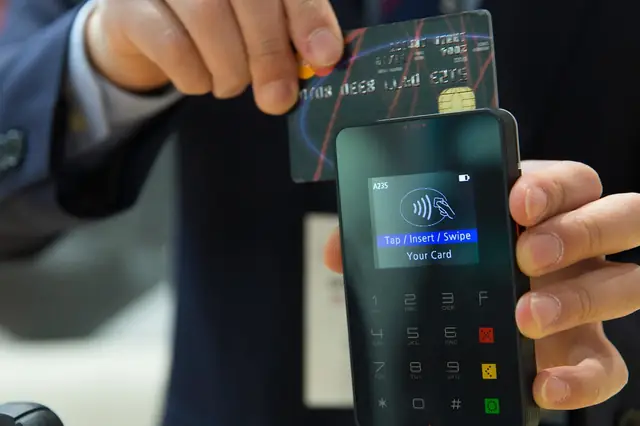
Photo: Pixabay
On this page 8 sections
- What Makes a Smart Payment Terminal Smart
- Traditional Countertop Terminals: Strengths and Limits
- Smart Terminal vs. Countertop Terminal at a Glance
- EMV Chip, Contactless, and Mobile Wallet Support
- Apps, Reporting, and Built-In Receipt Options
- Which Businesses Benefit Most From Each Type
- Compatibility Questions to Ask Your Processor
- Next Steps
Key takeaways
- A smart payment terminal runs apps, shows a touchscreen and often replaces a separate POS; a countertop terminal mainly takes payments.
- Both types can accept EMV chip, contactless and mobile wallet payments, so card acceptance alone isn't a reason to upgrade.
- Smart terminals fit tip-heavy, mobile or app-driven workflows; countertop machines suit simple, fixed-checkout businesses.
- Before you buy, ask whether the device is locked to one processor, what software fees apply and what your contract says.
Choosing between a smart payment terminal and a traditional countertop card machine looks like a hardware decision, but it is really a workflow decision. A smart terminal is a small computer that runs apps and can replace parts of your POS. A countertop terminal does one job: it takes the card and gets you paid. This guide explains what separates the two and where each one earns its keep. It also covers the compatibility questions to ask before you sign anything, so you don't pay for features you'll never use or miss ones you actually need.
What Makes a Smart Payment Terminal Smart
A traditional terminal runs fixed payment software. A smart terminal runs an operating system that can host apps, usually on a large color touchscreen. That difference drives everything else.
Common traits of smart terminals:
- Touchscreen interface for item entry, tip prompts, signatures and customer-facing screens
- App support for things like inventory, appointments, loyalty programs, time clocks and reporting
- Cloud connection that syncs sales data to an online dashboard you can check from a phone or laptop
- Multiple form factors, including countertop units, dual-screen stations and handhelds that move around the floor
- Built-in receipt choices: printed, emailed or texted, depending on the model and software
Android Payment Terminals and Their App Ecosystems
Many smart terminals are Android payment terminals. They run a version of Android that the manufacturer has locked down for payment security. You generally can't install any app you like from a public app store. Apps come from the manufacturer's or platform's own marketplace, where they're reviewed for compatibility and security.
That's a feature, not a flaw, but it matters when you shop. Before you choose a device for a particular app, confirm that the app is available on that platform. Ask, too, whether it carries its own monthly fee.
Traditional Countertop Terminals: Strengths and Limits
The classic countertop credit card machine sits by the register, connects through Ethernet, Wi-Fi or a phone line depending on the model, and prints a paper receipt. Many pair with a separate PIN pad so customers can insert or tap their own cards.
Where countertop terminals shine:
- Simplicity. Staff learn them in minutes, and there's little to configure.
- Lower upfront cost in many cases, though pricing varies widely by model and provider.
- Fewer moving parts. No app subscriptions to track and fewer software updates that change the screen layout.
- Reliability at a fixed checkout. If every sale happens at one counter, mobility adds nothing.
Where they fall short:
- Little or no itemized sales entry, so you still need a separate register or POS for inventory.
- Limited reporting beyond batch totals and basic transaction lists.
- Tip entry and receipt options are more basic.
- They're tied to one spot, which slows pay-at-table service or checkout away from the counter.
Smart Terminal vs. Countertop Terminal at a Glance
| Feature | Smart Terminal | Traditional Countertop Terminal |
|---|---|---|
| Primary role | Payments plus POS-style functions | Payments |
| Screen | Large color touchscreen | Smaller screen, keypad-driven |
| Apps | Yes, through a platform marketplace | Generally no |
| Reporting | Cloud dashboards, item-level data | Batch and transaction reports |
| Mobility | Countertop, handheld and dual-screen options | Usually fixed at the counter |
| Receipts | Print, email or text (model-dependent) | Mostly printed |
| Learning curve | Moderate | Low |
| Ongoing software costs | Possible, depending on apps and plan | Typically minimal |
Treat this table as a general pattern, not a rule. Some newer countertop models blur the line, and some smart terminals are configured to do little more than take payments. If you're deciding between a standalone terminal and a full system, see our guide to choosing between a credit card terminal and a POS system.
EMV Chip, Contactless, and Mobile Wallet Support
Here's the point that keeps many merchants from overbuying: card acceptance is not the main difference between the two types. Any current EMV terminal from a reputable manufacturer should read chip cards. Many also accept contactless taps from cards and mobile wallets such as Apple Pay and Google Pay through NFC.
What to check on any device, smart or not:
- EMV chip reading. Chip acceptance matters for fraud liability. Under card network rules, a merchant who can't process a chip card may bear more responsibility for certain counterfeit-card fraud. Confirm the specifics with your processor.
- Contactless and NFC. Customers increasingly expect to tap, especially at quick-service counters.
- PIN entry. Debit transactions often need a PIN, so the device or an attached PIN pad must support it.
- Current security certifications. Payment devices are certified for a limited time. Ask whether the model is current and when support is expected to end.
- Encryption. Ask whether card data is encrypted at the moment of capture and how that affects your PCI DSS responsibilities.
If your current machine already handles chip, tap and PIN reliably, card acceptance alone isn't a reason to upgrade. You might also want to understand how in-person transactions differ from remote ones; our guide to card-present vs. card-not-present fees, fraud and rules covers that.
Apps, Reporting, and Built-In Receipt Options
This is where a smart terminal justifies its price, or doesn't.
Apps worth paying for usually solve a daily problem you already have:
- Inventory tracking that updates as items sell
- Appointment booking tied to checkout
- Employee time clocks and tip pooling reports
- Loyalty or gift card programs
- Accounting sync. MannyPay supports a QuickBooks integration, for example, which can cut down on manual entry.
Reporting on a smart terminal typically shows sales by item, employee, hour and payment type, viewable from anywhere. A countertop machine tells you what you batched. A smart terminal can tell you what sold, who sold it and when.
Digital receipts cut paper costs, and they can capture customer email addresses or phone numbers. If you plan to use that contact information for marketing, check the consent rules that apply to you first.
Pricing programs are worth checking too. If you plan to run dual pricing or a cash discount program, confirm the terminal can display and process it correctly. Smart terminals often make two-price displays easier to show, but setup varies. For the rules behind each program, see cash discount vs. surcharge vs. dual pricing.
Which Businesses Benefit Most From Each Type
Retail Stores
A shop with a large catalog, frequent restocks and seasonal swings usually benefits from a smart terminal or a full POS. Item-level sales data shows what to reorder before the holiday rush. Barcode scanning speeds up lines. Returns are easier to look up when the original sale is itemized.
A small shop with a narrow product line and an existing inventory system may do fine with a countertop terminal. Our guide to the best POS systems for retail stores walks through that decision in more depth.
Restaurants and Bars
Full-service restaurants get some of the clearest value from handheld smart terminals. Servers can take payment at the table, guests see the tip screen themselves and the card never leaves their sight. Bars running tabs need dependable preauthorization and tip adjustment, so test how the device handles adjusting tips after the sale. Our explainer on credit card tip adjustment explains where that process tends to break.
A counter-service spot with a single register and a short menu, where customers pay at a fixed counter, can often run well on a countertop terminal with a customer-facing PIN pad.
Salons and Spas
Salons and spas run on appointments, tips and repeat clients. A smart terminal that ties booking, service tickets and checkout together cuts double entry at the front desk. A customer-facing tip screen keeps gratuity private. Reporting by stylist or therapist also makes commission and tip payouts easier to reconcile.
Booth-rental salons where each stylist takes their own payments have different needs, so map out who gets paid before you choose hardware. Our salon POS buyer's checklist covers the details.
Professional Services
Accountants, consultants, law offices and similar firms often take relatively few in-person payments, typically larger and invoice-driven, while many clients pay remotely. A full smart terminal may sit idle most of the day. A simple countertop terminal for the occasional walk-in payment, paired with a virtual terminal for phone and emailed payments, is often the better fit. If that sounds like your firm, read what a virtual terminal is and how it works. Firms with trust accounting obligations should also confirm how payments are routed with a qualified professional.
Compatibility Questions to Ask Your Processor
Hardware decisions get expensive when they clash with your contract or software. Ask these questions before you commit. For a wider look at which services fit your monthly volume, see merchant services for small business: what you need and what to skip.
- Is this device locked to one processor? Some terminals can only be used with a specific processor or platform. Ask whether you could reprogram the device if you switched providers.
- Buy, lease or bundle? Leases can cost more over time than buying outright. Read the lease terms separately from the processing agreement.
- What software fees apply? Ask about monthly platform fees, per-device charges and paid apps.
- Does it work with my POS, gateway or e-commerce platform? If you sell online too, confirm that in-store and online sales can be reported together.
- What connectivity does it need? Wi-Fi, Ethernet or cellular. Ask what happens when the internet goes down and whether offline transactions carry extra risk.
- Who handles updates, repairs and replacements? Find out the turnaround time and whether a loaner is available.
- What's the contract term? Hardware is often tied to processing agreements. Know the exit terms before you sign; our guide to merchant account early termination fees explains what to look for.
For a broader checklist on vetting the company behind the hardware, see how to choose a merchant service provider.
Quick rule of thumb: If you can name at least two daily tasks a smart terminal would take off your plate, such as tableside payments, appointment checkout or inventory updates, it's likely worth evaluating. If you can't, a well-supported EMV countertop terminal may be all you need.
Next Steps
Start with your checkout, not the catalog. Write down where payments happen, who takes them, whether tips are involved and what reports you check each week. Then match the device to that list.
MannyPay sells hardware from Clover, Valor, Dejavoo, PAX, First Data and SwipeSimple. That range covers smart terminals, full POS systems, handheld units and PIN pads, so you can compare options side by side. When you're ready, request a free quote, and a MannyPay specialist will respond within one business day to review your setup and pricing options.
This article is for general educational purposes and is not legal, tax or financial advice. Card network rules and state laws change; confirm current requirements for your business.