Credit Card Terminal vs POS System: Which Do You Need?
Credit card terminal vs POS system: use catalog size, staff count and reporting needs to choose the right setup without paying for more than you need.

Photo: Pixabay
On this page 9 sections
- Credit Card Terminal vs POS System: The Short Answer
- What a Standalone Credit Card Machine Does
- What a Full POS System Adds
- Businesses That Do Fine With Just a Terminal
- Do I Need a POS System? Signs You've Outgrown a Terminal
- Hybrid Options: Smart Terminals With POS Apps
- What Each Setup Really Costs
- A Quick Decision Checklist: Card Terminal or POS
- Next Steps
Key takeaways
- A standalone terminal takes payments. A POS system also runs the sale, including items, inventory, staff and reporting.
- Small catalogs, few staff and invoice-based billing usually point to a terminal. Many SKUs, several cashiers and inventory questions point to a POS.
- Smart terminals that run POS apps are a middle option for businesses that need some features, not all of them.
- Compare hardware, software subscriptions and processing terms together before you commit to either setup.
The credit card terminal vs POS system decision comes down to what you need at the counter. Some businesses only need to get paid. Others need to run the whole sale, track inventory and manage staff. Buying a full POS when a simple terminal would do wastes money every month. Squeezing a growing store through a basic card machine wastes time and hides useful data. This guide explains what each option does, which businesses fit each one, and the signs that you've outgrown a terminal. It ends with a short checklist so you can decide with confidence.
Credit Card Terminal vs POS System: The Short Answer
A credit card terminal takes payments. A POS (point of sale) system takes payments and also manages what's being sold, who's selling it and what happened afterward.
The right choice depends on three things:
- Catalog size. Do you sell a handful of services or hundreds of SKUs?
- Staff. Is it just you, or do several people ring sales across shifts?
- Reporting needs. Is a daily batch total enough, or do you need sales by item, employee and category?
If all three answers are small, a terminal is usually enough. If any of them is large, look at a POS.
What a Standalone Credit Card Machine Does
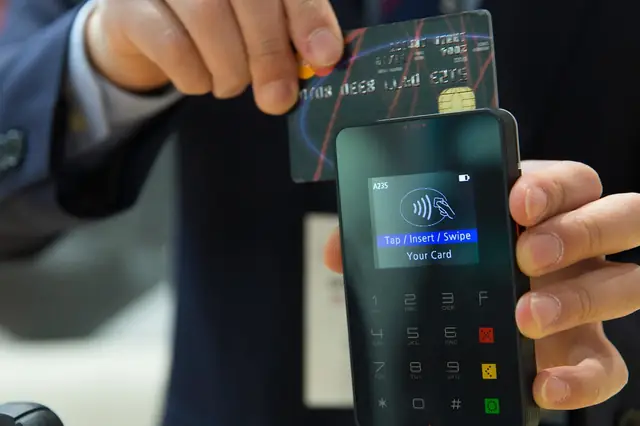
A standalone credit card machine connects to your processor and does one job well: it authorizes card payments. Most modern countertop terminals handle:
- EMV chip, contactless (tap) and mobile wallet payments
- PIN debit
- Manual card entry when a card won't read
- Tips, refunds and voids
- Printed or digital receipts
- Daily batch settlement and basic reports, such as totals by card brand
You key in an amount, the customer pays, and the money settles to your bank account. Most standalone terminals don't track what was sold. A $120 sale is just $120, not "two brake pads and an hour of labor."
Countertop models such as the Valor VL100 Pro and the Dejavoo QD4 are examples of this category. A terminal also suits businesses that already run their pricing, invoicing or scheduling in other software and just need a reliable way to take cards.
What a Full POS System Adds
A POS system wraps payment acceptance in software that runs the sale. Depending on the system, you get:
- Item catalog. Products, variants (size, color, flavor), prices and tax rules, rung up by tap or barcode scan.
- Inventory tracking. Stock counts that drop with each sale, low-stock alerts and receiving tools.
- Employee management. Individual logins, permission levels (for example, who can issue refunds or discounts) and sometimes time clocks.
- Customer records. Purchase history, loyalty programs and gift cards.
- Detailed reporting. Sales by item, category, hour and employee, plus exportable data for your bookkeeper.
- Integrations. Connections to accounting tools such as QuickBooks or to e-commerce platforms.
MannyPay sells POS systems from Clover and other brands, including countertop setups like the Clover Duo. The trade-off is cost and complexity. A POS usually involves more hardware, a software subscription, and setup time to build your catalog and train staff.
Businesses That Do Fine With Just a Terminal
A terminal is often the smarter buy when sales are high-value, low-volume or already tracked elsewhere.
Professional Services Firms
Accountants, consultants, law firms and similar practices usually bill by invoice or engagement. They have no inventory and only a few transactions a day. Some clients pay at the front desk, while others pay later by phone or online. A countertop terminal for in-office payments, often paired with a virtual terminal for card-not-present payments, covers most needs. A POS catalog adds little when every engagement is priced differently.
Firms with client trust account obligations should confirm how card payments and processing fees must be handled. Check with your state bar or a qualified professional before choosing a setup. MannyPay works with professional services businesses on this kind of setup.
Auto Repair Shops With Shop Management Software
Most repair shops build estimates and repair orders in shop management software, not in a retail POS. That software already tracks parts, labor, customer vehicles and approvals. A separate POS catalog would duplicate work the shop software already does.
For many shops, the right fit is a terminal at the service counter, ideally one that integrates with their shop software so amounts don't need retyping. Tickets tend to be larger and fewer than in retail. That makes accurate records and signed estimate approvals more important than a fast checkout. Some shops add a handheld device so customers can pay at the vehicle during pickup. If you run a shop, MannyPay's auto repair payment solutions and our guide to auto repair credit card processing fees are useful next reads.
Other Good Terminal Candidates
- Sole proprietors and appointment-based services with a few set prices
- Businesses that take occasional in-person payments but sell mostly online
- Second locations or backup checkout stations
Do I Need a POS System? Signs You've Outgrown a Terminal
If you're asking "do I need a POS system," look for these warning signs:
- You're keying in prices from memory or a printed list. Errors creep in, and pricing changes are hard to roll out.
- You don't know what's selling. A batch report shows totals but not which items drive revenue.
- Inventory counts are guesswork. You find out you're out of stock when a customer asks.
- Multiple people share one login. You can't tell who processed a refund or applied a discount.
- End-of-day reconciliation takes too long. You're matching terminal totals against notebooks or spreadsheets.
- Lines form at peak times. Typing amounts by hand slows checkout when it matters most.
Retail Stores With Real Inventory
Independent retailers feel these problems first. A boutique carrying apparel in multiple sizes and colors, or a gift shop with hundreds of SKUs, needs barcode scanning, variant tracking and returns tied to the original sale. Holiday peaks make fast checkout and accurate stock counts matter even more. For a deeper walkthrough, see our guide on how to choose a retail POS system and MannyPay's retail industry page.
Tobacco and Smoke Shops
Smoke shops have needs that a basic terminal can't handle:
- Pack vs. carton pricing for the same product, with stock deducted correctly either way
- Age verification prompts tied to specific SKUs, so cashiers are reminded to check ID every time
- Many small, fast transactions, often from regulars
- Tracking of tax-stamped and restricted products, where state and local rules on flavors, product types and recordkeeping vary
A POS with age-locked SKUs and good inventory controls reduces compliance risk and shrinkage. Tobacco merchants also face closer underwriting scrutiny, so tell your processor up front about everything you sell. If you plan to add product lines such as vape, review when to tell your payment processor about business changes. Our article on the best POS for smoke shops goes deeper, and MannyPay supports tobacco and cigarette retailers.
Hybrid Options: Smart Terminals With POS Apps
The choice isn't strictly either-or. Smart terminals are app-capable devices that take payments and can also run lightweight POS software: a basic item list, tips, simple reporting and sometimes inventory.
This middle path works well for:
- Small shops with a modest catalog that don't need a full counter setup
- Service businesses that want itemized receipts without a full POS
- Businesses that want to start simple and add features later on the same device
Examples include the PAX A920 Pro and the Clover Flex 4G, and you can browse MannyPay's full range of smart terminals. Before you buy, confirm which apps are available, whether they carry a monthly fee, and whether they cover your must-have features. Our comparison of smart payment terminals and traditional card machines explains the trade-offs in more detail.
What Each Setup Really Costs
Hardware price is only part of the picture. When you compare a POS vs card machine, add up:
| Cost Factor | Standalone Terminal | Smart Terminal | Full POS System |
|---|---|---|---|
| Hardware | Typically lowest | Moderate | Highest (screens, printers, scanners, cash drawers) |
| Software subscription | Often none | Sometimes, for apps | Usually, often per device or location |
| Setup and training | Minimal | Light | Catalog build, staff training |
| Processing terms | Same considerations for all three | Same | Same |
A few cautions apply:
- Equipment leases can be difficult or impossible to cancel early. Read the lease terms before you sign.
- Software tied to a single processor can make switching providers harder later.
- Processing pricing usually matters more over time than hardware. Ask for a clear rate structure.
Cost programs such as dual pricing, cash discount or surcharging (where permitted) work with terminals and POS systems alike. Rules and setup requirements differ, so confirm current card network and state rules before you enable one.
Your setup can also affect your PCI compliance workload. See which PCI SAQ applies to your business.
A Quick Decision Checklist: Card Terminal or POS
Answer each question honestly:
- How many distinct items or services do you sell? A handful points to a terminal. Dozens point to a smart terminal. Hundreds point to a POS.
- Do you track physical inventory? No points to a terminal. Yes points to a POS.
- How many people take payments? One or two points to a terminal. Several across shifts points to a POS with employee logins.
- Do you already use industry software (shop management, practice management, invoicing)? Yes points to a terminal, ideally integrated with that software.
- What reports do you need? Daily totals points to a terminal. Sales by item, hour or employee points to a POS.
- Do you sell age-restricted products? Yes points to a POS with SKU-level prompts.
- Where do customers pay? At one counter, any option works. At the vehicle, table or job site, consider a handheld or mobile terminal.
Illustrative example: A two-person bookkeeping firm with a few fixed-fee services fits a terminal plus virtual terminal. A three-bay repair shop running shop management software fits an integrated counter terminal. A smoke shop with a deep carton-and-pack catalog fits a full POS.
Next Steps
Start with how you sell today and where you expect to be in a year or two. Don't buy for an ideal future store you may never run. If a terminal covers your needs, keep it simple. If you're losing time to manual entry, inventory guesswork or shared logins, a POS or smart terminal will likely pay off in time saved and better data.
If you'd like help comparing options for your business, request a free quote from MannyPay. A MannyPay specialist will respond within one business day to review your setup, the hardware that fits, and the processing terms behind it.
This article is for general educational purposes and is not legal, tax or financial advice. Card network rules and state laws change; confirm current requirements for your business.