Restaurant POS vs. Retail POS: Key Feature Differences
Restaurant POS vs retail POS: see which kitchen and inventory features each is built for so your cafe, bakery or shop buys the right system.
Photo: Pixabay
On this page 6 sections
- Restaurant POS vs. Retail POS: Why the Systems Specialize
- Restaurant POS Features Built Around the Order
- Retail POS Features Built Around the Product
- Hybrid POS for a Cafe With Retail, Bakeries and Shops With Food
- Hardware Differences Between Kitchens and Sales Floors
- Five Questions to Put to Any POS Vendor
A restaurant POS is built around the order's trip from the customer to the kitchen and back. Its strengths are modifiers and kitchen ticket routing. It also keeps checks open while guests eat and lets staff add tips after the card is run. A retail POS is built around the product. It tracks each SKU down to size and color and knows what's on the shelf after every sale and return. When you compare restaurant POS vs. retail POS, find the workflow that causes the most trouble during your busiest hour. Then pick the system that handles that workflow well.
Hybrid businesses face the hardest choice. A cafe that sells bags of beans can end up with a system that fits only half of what it does. A boutique with a coffee bar can make the same mistake from the other side. The right answer depends on which half carries the business.
Restaurant POS vs. Retail POS: Why the Systems Specialize
Every POS records sales and takes payments. If you want the basics first, read what a POS system is and how it works. The two types split on the unit of work.
In a restaurant, the unit is the order. One latte can carry several instructions, like oat milk and an extra shot, and the barista has to see them before steaming the milk. A dinner check may stay open for an hour and then get split between friends. The tip often arrives after the card has already been run.
In a store, the unit is the item. A T-shirt might come in several sizes and colors. The system has to know how many medium navy shirts are in the back. It should sell one with a single scan and put it back into stock when it comes back as a return two weeks later.
Those jobs need different data structures and different screens. That's why vendors build separate restaurant and retail modes even when the hardware is identical. For a wider map of the categories, see our guide to types of POS systems and which kind fits your business.
Restaurant POS Features Built Around the Order
Modifiers come first. A good restaurant system forces the choices a cook needs, such as steak temperature or the side dish, and prices add-ons automatically. Free-text notes cover anything unusual. A system that offers only an "add a note" field slows the line, and vague notes lead to remakes.
Kitchen routing is the second test. Drinks print at the bar while entrées go to the line, and desserts wait until the server fires them. Full-service kitchens use coursing and seat numbers to pace a table. In quick service, the same idea sends a drink ticket to the espresso machine while the cashier takes the next order.
Tables and tabs follow. Look for a floor map and open checks that can move from one server to another. Bars need tabs held with a card on file. Split checks should work by seat or by item, not only evenly. In full-service dining, the card is usually authorized before the tip is known, and the tip is added afterward from the slip or the screen. Ask your processor how its system handles tip adjustments before you rely on them.
Menus also change during the day. When the kitchen runs out of an item, you should be able to mark it sold out ("86 it") once and have it disappear from every station. Happy-hour prices and a brunch menu should switch on a schedule rather than by hand.
Voids and comps need manager approval and a report behind them. A ticket voided after it reached the kitchen is food you already paid for. The card side matters too: a mistaken charge is handled differently before it settles than after. Our explainer on when to void vs. refund a transaction covers how each choice affects your fees. Labor reporting rounds out the list by tying clock-ins to sales by server, so tip pools come from the same data.
Restaurant inventory usually works at the ingredient level, counting pounds of brisket or gallons of milk. Few restaurant systems handle size and color variants well, and that gap matters once a shelf of merchandise appears.
Retail POS Features Built Around the Product
Retail software assumes you stock hundreds or thousands of distinct items and need to know where each one is.
Start with the variant matrix. Apparel and footwear stores need one parent item with a size-by-color grid under it, where each cell carries its own SKU and its own stock count. Without that grid, reporting on what sold and what to reorder turns into guesswork.
Barcodes drive the rest of the day. Staff receive a shipment against a purchase order and print hang tags. At checkout they scan instead of hunting through menu buttons. Low-stock alerts and reorder points show what to buy before it runs out, and multi-location stores need transfers between shops.
Returns expose weak retail setups. The system should look up the original sale and put the item back into stock. From there it refunds the original card or issues store credit, with a gift receipt printed when the customer asks.
Customer records and promotions carry more weight in retail than at a cafe counter. Purchase history supports loyalty programs and special orders. Seasonal markdowns should apply by category, and any manual price override should leave an audit trail.
Grocery markets add their own layer. Scales connect to the register for produce and deli items, and price-lookup codes handle unpackaged goods. The register should prompt for ID on age-restricted products. If you plan to accept government food benefits, check the eligibility and equipment requirements before choosing a system. A store with a large SKU count may also outgrow the POS's built-in inventory. Our article on when inventory software beats your POS explains where that point usually falls.
Hybrid POS for a Cafe With Retail, Bakeries and Shops With Food
A hybrid POS runs both workflows at one counter. Some platforms do this well. Others make you pick a restaurant or retail mode at setup and limit the other side. To decide, work out which side would cost you more if it were poorly supported.
The two businesses below are illustrative. The sales mix for each is an assumption, not a benchmark.
Worked Example: A Cafe-Bakery
Most of this shop's sales are espresso drinks and pastries ordered at the counter, and most of those come in the two hours before people start work. A smaller share comes from custom cakes ordered days ahead with a deposit. A shelf of a few dozen retail items, mostly beans and mugs, brings in the rest.
The morning rush is the workflow that can't fail. Without modifiers and drink tickets routed to the espresso bar, every order slows down and the line backs up out the door. Cake orders need a deposit and a pickup date attached to the ticket. Many restaurant systems handle these as saved or open orders, but test it before you buy. A few dozen barcoded items are a light load for most restaurant item libraries once you add a scanner.
Verdict: buy restaurant-first, usually a quick-service mode, and confirm it can scan barcodes and keep simple stock counts.
Worked Example: A Boutique With a Coffee Bar
Here the mix flips. Most revenue comes from a large apparel catalog sold in sizes and colors, with seasonal markdowns and frequent exchanges. A small coffee bar brings in the rest.
A restaurant system without variant matrices would turn every size and color into its own button, and the stock counts would be unreliable within a season. The coffee bar needs only a handful of modifiers and, ideally, a small ticket printer behind the bar.
Verdict: buy retail-first, and confirm it supports required modifiers and can send drink orders to a separate printer.
Both verdicts follow one rule. Choose the system that handles your highest-volume, most time-sensitive workflow well, then confirm it covers the minimum the other side needs.
Sales Tax Is the Hybrid Trap
Depending on your state, food eaten on site may be taxed differently from the same food packaged to go. A whole cake and a slice eaten at a table may not carry the same tax. Your POS needs tax rates set per item and, ideally, a dine-in or to-go toggle that changes the rate. Rules vary by state and sometimes by city, so confirm your setup with a qualified tax professional. This is general information, not tax advice.
When Two Separate Systems Make Sense
A separate system for the cafe counter and another for the shop floor can work when they really are separate counters with separate staff. The cost is reconciliation, because you'll match two sets of reports and two daily batches. Customers also can't put a latte and a mug on one receipt.
Hardware Differences Between Kitchens and Sales Floors
The terminal may look the same in either setting. The equipment around it usually doesn't.
| Need | Restaurant setup | Retail setup |
|---|---|---|
| Order output | Kitchen printers or display screens at each station | Receipt printer, sometimes a label printer |
| Item entry | Touchscreen menus with modifier prompts | Barcode scanner, plus a scale in grocery |
| Mobility | Handhelds for pay-at-table and tableside ordering | Mobile devices for line-busting and inventory counts |
| Customer-facing | Tip prompts and signature screen | Display showing items and price |
| Self-service | Ordering kiosks for quick service | Self-checkout in some formats |
| Environment | Heat, grease and spills near the line | Constant scanning and long shifts |
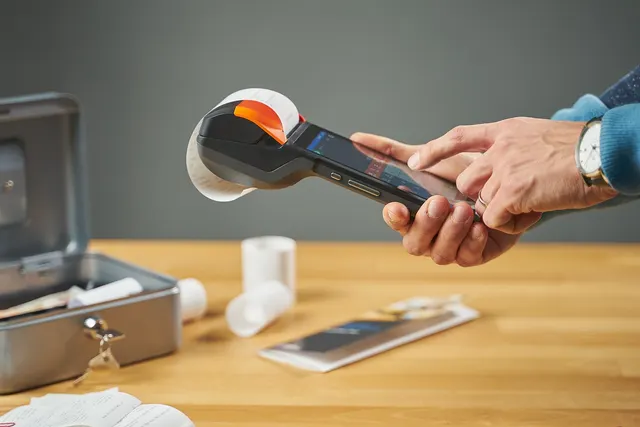
Kitchens are hard on hardware, so place printers and screens with heat and splashes in mind. Restaurants that want guests to pay at the table usually choose handheld card terminals such as the Clover Flex or PAX A920 Pro. Quick-service concepts trying to shorten lines often look at self-order kiosks. Customers in both settings expect to tap their card or phone. Our comparison of tap, chip and swipe speed and liability explains why that affects both fraud liability and line speed.
For countertop setups that work in either mode, browse MannyPay's POS systems for restaurants and retail. Our industry pages cover restaurants and bars and retail stores. Grocers and boutiques have their own pages: grocery market payments and apparel and boutique payments.
Five Questions to Put to Any POS Vendor
- Ask for a demo of your busiest hour. Hand the vendor your real peak-time order mix, such as a stack of modified drinks plus a couple of retail items, and watch someone ring it up. A feature list won't show you how many taps each order takes.
- See both inventory styles side by side. Have the vendor set up a size-and-color variant item next to a recipe-based menu item, and look at how each one reports stock.
- Confirm tax rates can vary by item and by order type. Cafes and bakeries can easily overlook this until the first sales tax filing.
- Find out what works offline. Check whether the system keeps taking cards and printing kitchen tickets during an internet outage, and how those transactions settle once the connection returns.
- Ask whether the software is tied to one processor. Some POS platforms only work with their own processing, which affects your rates and your options if you ever want to switch. While you're at it, ask which pricing programs the system supports, such as dual pricing for cash and card customers. Rules for those programs vary by card network and by state.
For a longer list sorted by industry, use our POS feature checklist by business type.
Before you talk to any vendor, write down your busiest hour and the five most common orders during it. Add a rough count of the distinct items you stock. Those notes will show whether you need restaurant-first, retail-first or a true hybrid. If you'd like a second opinion on the hardware and processing behind it, request a free POS and processing quote. A MannyPay specialist responds within one business day.
This article is for general educational purposes and is not legal, tax or financial advice. Card network rules and state laws change; confirm current requirements for your business.