Self-Service Kiosk Payments: Hardware, Fees, and PCI Requirements
Self-service kiosk payments explained: pick an unattended terminal that's configured correctly, and keep PCI and accessibility risk low.
Photo: Pixabay
On this page 7 sections
Key takeaways
- Have your processor confirm in writing that each kiosk reader runs an unattended terminal profile, because that setting affects which network rules and interchange categories apply.
- A reader that encrypts card data itself keeps the kiosk computer away from card numbers, which is the biggest lever you have on PCI scope.
- Pricing programs built for a counter need new screen disclosures at a card-only kiosk, and some places require businesses to take cash at all.
- Run the payback formula twice, once with half the labor savings you expect. A fixed software fee makes the slow case more than twice as long.
Self-service kiosk payments are card-present sales in which the customer operates the terminal and no employee is watching. That one difference changes the hardware you need and how the card networks classify the sale. It also moves more of the security and accessibility work onto you. Set a kiosk up correctly and it behaves like any other in-person sale. Set it up wrong and you risk downgraded transactions or a tampered reader that nobody notices for weeks.
How Self-Service Kiosk Payments Work
A kiosk is really two systems sharing one enclosure. One is the ordering application, the touchscreen software that shows your menu or class schedule. The other is the payment device mounted in or beside the screen. When a customer finishes an order, the app sends the total to the reader. The customer taps or inserts a card, and the reader sends the authorization through your gateway to the processor. Once an approval comes back, the app releases the order to the kitchen or prints the ticket.
In a well-built setup, the ordering software never sees a card number. Encryption happens inside the reader, which hands the app only an approval and a token. That design choice decides how much PCI work you face, so settle it before you buy anything.
What a kiosk has to do varies a lot by business:
- Restaurants and bars: Orders go straight to the kitchen display, so the kiosk menu has to stay synced with the POS. If a sold-out item stays on the screen, the kitchen ends up refunding orders it can't make.
- Retail: A self checkout card reader sits next to a scanner and bagging scale. Age-restricted items such as alcohol or tobacco still need an employee to check ID before the sale completes.
- Events and ticketing: Ticket pickup and concession kiosks see demand in short bursts, like the hour before doors open. Crowded venues often have crowded networks too, which makes offline handling important. Our guide to store-and-forward payments without internet covers the tradeoffs.
- Gyms and martial arts studios: Kiosks handle member check-in and day-pass sales, and often sell small items like hand wraps or drinks. Some 24-hour clubs run them through hours when no one is on staff.
Choosing a Kiosk Payment Terminal
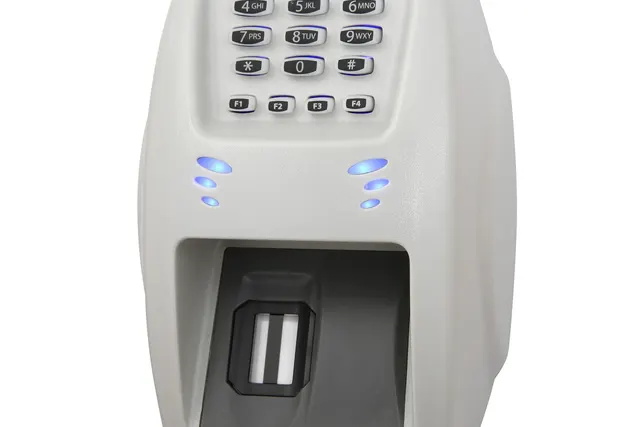
A countertop terminal zip-tied inside a cabinet is not an unattended terminal. Readers built for unattended use mount flush into an enclosure, and their tamper-responsive housings erase the encryption keys if someone pries them open. They are also designed to survive spills and constant handling. Our guide to unattended payment terminals goes deeper on device types.
When comparing devices, work through five questions:
- Is it certified for unattended use with your processor? A well-made device can still fail to work on your processing platform in unattended mode. Get the answer in writing.
- Does your ordering software already integrate with it? A common kiosk mistake is buying software from one vendor and the reader from another, then discovering they don't talk to each other.
- Does it accept contactless and chip? Tap-to-pay is faster and keeps the card out of the slot where skimmers live. Our guide to contactless payments and NFC setup explains what it takes.
- Do you need PIN entry? Accepting PIN debit requires a PIN entry device approved for that use. A separate PIN pad is one option.
- How does it connect? Wired Ethernet beats shared Wi-Fi for reliability, and a cellular backup keeps sales moving when the main line drops.
You can also choose between an all-in-one kiosk and separate components. MannyPay sells all-in-one units such as the Clover Kiosk, where ordering and payment run on one POS platform. It also offers other self-service kiosks that pair with separate readers. All-in-one units are simpler to support. Component setups give you more freedom to pick ordering software.
Unattended Payment Processing Rules and Interchange
Every authorization message carries data describing the terminal that sent it, including whether a cardholder completed the sale with no employee present. Visa and Mastercard treat these customer-operated transactions as their own type in their network rules. Some unattended categories also carry their own interchange, which is the wholesale fee the card issuer earns on each sale. Those are network rules, and your processor's markup sits on top of them.
Configuration is where merchants get caught. A kiosk reader set up with an attended terminal profile sends transaction data that doesn't match how the sale happened. That mismatch can cost you the correct rate or create compliance trouble later. Ask your processor to confirm the terminal profile for every kiosk device before launch. On interchange-plus pricing you can verify it yourself, because each interchange category prints as its own statement line. Our comparison of interchange-plus versus flat-rate pricing models shows what to look for.
A kiosk does not change your merchant category code (MCC). A restaurant taking orders on a touchscreen is still a restaurant. If anyone suggests coding the kiosk under a different category to get a better rate, say no. That is miscoding, and it puts your merchant account at risk.
Some kiosks don't know the final amount when the card is tapped. Self-pour beer walls and equipment rentals both work this way. They rely on an authorization for an estimated amount that gets adjusted later, and network rules limit how that estimate is set and how quickly the sale must be finalized. Customers notice holds, so read up on how long credit card authorization holds last before choosing an amount. If your customers pay with prepaid or gift cards, ask whether your setup supports partial approvals.
Cost Programs on a Card-Only Screen
Many owners assume their pricing program carries over from the counter to the kiosk unchanged. It usually needs rework. Each program has its own disclosure rules, typically including clear notice before payment and on the receipt. At a kiosk, the screen has to deliver what a cashier or counter sign used to. Surcharges face extra limits: card brands restrict which card types can carry one, and some states restrict or ban them. A cash discount program assumes the customer can pay cash, so a card-only kiosk needs to tell customers where the cash price is available, such as at the counter.
Some jurisdictions also require businesses to accept cash, so a kiosk-only storefront can run into trouble regardless of pricing. Our explainer on New Jersey's cashless business law is one example. To see where the programs diverge, read how the three card-fee programs differ, and review MannyPay's surcharging program for where it is permitted. Confirm the exact requirements with your processor and a qualified attorney before changing any kiosk screens.
Kiosk PCI Compliance and Tamper Protection
Any device that reads cards falls under PCI DSS, the card industry's data security standard. So does the network it connects to. Three decisions make kiosk PCI compliance manageable.
Encrypt at the reader. With point-to-point encryption, card data is encrypted inside the payment device and decrypted only by the processor. If the kiosk computer never handles readable card data, a compromised touchscreen exposes far less. Ask whether the encryption solution carries formal PCI validation. Your processor can tell you whether that shortens your compliance paperwork.
Use approved PIN hardware. If the kiosk takes PIN debit, ask the vendor for documentation showing the PIN entry device is approved for that purpose. Confirm the approval covers unattended deployment, not just countertop use.
Lock down the kiosk computer. Run the ordering app in a locked kiosk mode with no browser or desktop access. Put payment devices on a network segment separate from guest Wi-Fi, and change every default password. Turn on automatic security updates, and require multifactor login for remote management.
Physical checks matter more at a kiosk than at a counter, because nobody stands beside the reader all day. A sensible routine, which your processor can map to the requirements that apply to you, looks like this:
- Record each device's serial number and location.
- Inspect every reader at opening for overlays and broken tamper seals.
- Keep a signed log of each inspection.
- Train staff to pull any device that looks wrong out of service.
Most small and mid-size merchants validate compliance each year with a self-assessment questionnaire. Which one applies, or whether you need a different assessment, depends on your volume and how your system is built. Ask your processor before choosing hardware.
Fraud Risks When No Cashier Is Watching
Without a cashier, nobody compares a face to a card or notices someone fiddling with the reader. Kiosk fraud tends to fall into four groups.
Skimming and shimming. Criminals fit overlays on card slots, or slip thin "shimmers" inside chip readers, to capture card data. Steering customers toward tap reduces that exposure because the card never enters a slot. Wallet payments add tokenization, which swaps the real card number for a substitute.
Stolen and counterfeit cards. Chip support matters for liability as well as security. Under the networks' EMV rules, liability for counterfeit fraud can land on the merchant when the terminal doesn't support chip. Our explainer on the EMV liability shift covers how that works.
Card testing. Fraudsters check whether stolen cards work by running small purchases at unattended devices. Ask your processor about velocity limits, which cap how many attempts one card or device can make in a short window.
Disputes from confused customers. These can be a significant kiosk cost, and each industry has its own version. Restaurant customers dispute orders they never picked up because they missed their number being called. Gym members who sign up at a kiosk may later dispute the recurring charge, so the screen needs plain terms and the customer's explicit consent before you store a card for billing. Event buyers dispute charges when ticket pickup fails.
Keep refunds off the kiosk and route them to staff. Place kiosks where employees can see them, and point a camera at each payment device.
ADA Accessibility for Payment Kiosks
This section is general information, not legal advice. The Americans with Disabilities Act applies to businesses open to the public, which covers most restaurants, stores, gyms and venues. Accessibility rules written specifically for kiosks are still developing. Businesses open to the public are already expected to serve customers with disabilities, though, and a touchscreen that a blind customer can't operate works against that.
Practical steps reduce the risk:
- Choose hardware with a tactile keypad and an audio jack, so customers who are blind can complete a purchase with audio guidance.
- Mount kiosks at an accessible height with clear floor space in front. Federal accessibility standards address reach ranges and clear floor space, and an attorney can confirm what applies to your site.
- Ask your software vendor for an accessibility conformance report that covers contrast and screen timeouts.
- Keep a staffed alternative that is actually open. A closed counter with a sign is not an alternative.
Have an attorney who knows ADA compliance review your plans before installation.
What Self-Service Ordering Costs and When It Pays Back
Kiosk costs come in six buckets:
- Kiosk hardware and the payment reader that mounts in it
- Installation and network wiring
- A software subscription for each kiosk
- Card processing
- Repairs and spare units
- Staff time for daily inspections
Processing usually follows your existing pricing structure, though unattended interchange categories can move the per-sale cost.
The return usually comes from labor. A busy quick-service restaurant might use a kiosk to move a cashier onto food prep during lunch instead of adding a shift. You can test that with figures from your own quotes and payroll:
- Monthly labor saved equals labor hours removed per week, times your hourly wage, times 52, divided by 12.
- Net monthly benefit equals monthly labor saved minus the kiosk's monthly software fee. If kiosk processing costs differ from counter sales, subtract the difference here too.
- Payback in months equals your up-front hardware and installation cost divided by the net monthly benefit.
The software fee is what makes this math unforgiving. It stays the same whether the kiosk saves eight hours a week or four. Cut the hours saved in half and the net benefit falls by more than half, so the payback period more than doubles. Run the formula twice, once with the hours you expect and once with half. If the slower case still pays back well within the life of the hardware, the kiosk holds up. Count only hours that actually come off the schedule, not hoped-for larger orders. Our guide to break-even analysis helps pressure-test the inputs.
Before signing, get written answers on two points: whether the reader is certified for unattended use with your processor, and how its terminal profile will be configured. Then settle who replaces a device that fails a tamper check, because a kiosk with a dead reader takes no orders. To compare kiosk hardware and pricing, request a free kiosk payment quote and a MannyPay specialist will respond within one business day.
This article is for general educational purposes and is not legal, tax or financial advice. Card network rules and state laws change; confirm current requirements for your business.