Biometric Payments: Palm, Face, and Fingerprint Checkout Explained
Biometric payments explained: how palm and face checkout work, how they differ from wallet Face ID, and the privacy laws that can create liability.
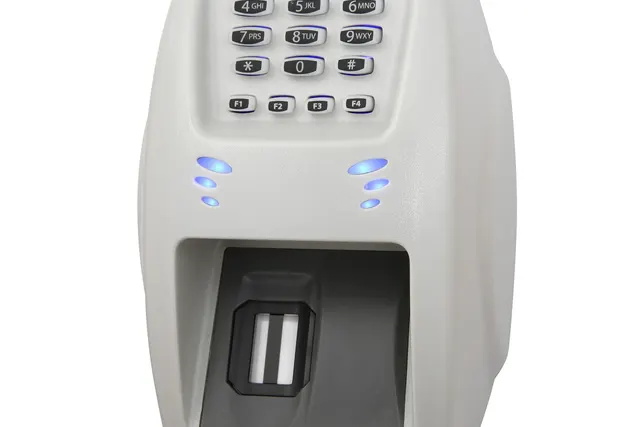
Photo: Pixabay
On this page 6 sections
Key takeaways
- Customers who unlock a phone wallet with Face ID or a fingerprint aren't giving you biometric data. The match stays on their device, and your terminal only receives a card token.
- Standalone palm and face systems still end in a card charge, so ask how sales are categorized, which merchant account they settle to and who handles disputes.
- Biometric privacy obligations come from state and local law, not card network rules, and using a vendor's scanner may not move liability off your business.
- A scanner only speeds up shoppers who have enrolled, so every lane still needs a tap-ready card terminal.
Biometric payments come in two very different forms. Your customers already use the first kind every day. A phone or watch wallet checks their face or fingerprint before it releases a card token to your terminal. Your business never touches the biometric, so nothing changes for you. The second kind is standalone palm or face checkout. A scanner at your counter identifies the shopper and charges a card they linked earlier. That can shorten lines, but it puts biometric data inside your operation, and that can bring state and local biometric privacy laws into play.
Two Kinds of Biometric Payments
Many merchants misunderstand this point. Accepting Apple Pay or Google Pay from a customer who unlocks it with Face ID or a fingerprint does not make you a collector of biometric data. The match happens on the customer's device, against a template stored on that device. If it succeeds, the phone sends your terminal a tokenized card credential over NFC, the same way a contactless card would. You receive a token. You never receive a face. If you want a refresher on what tap acceptance needs on your end, our guide to contactless payments and NFC setup costs covers it.
Standalone biometric checkout reverses that arrangement. The scanner belongs to the merchant or the merchant's vendor. The biometric template sits in the vendor's system, and the match happens there. In effect, the scanner has to pick one person out of everyone enrolled and then charge the card linked to that person.
| Wallet authentication (Face ID, fingerprint) | Standalone palm or face checkout | |
|---|---|---|
| Where the biometric is stored | Customer's own device | Vendor's system, sometimes the cloud |
| What your terminal receives | A card token over NFC | An identity match, then a charge to a stored card |
| Hardware you need | Any NFC-enabled terminal | A dedicated scanner plus your normal terminal |
| Biometric privacy law exposure | Generally none for the merchant | Possible, depending on location and contract |
So the real decision is narrower than "should we do biometrics." Wallet biometrics are already in your store. The open question is whether to install a system that captures biometric data on your premises.
How Palm and Face Checkout Systems Work
Every standalone system starts with enrollment. The shopper scans a palm or face, often at a kiosk or in a phone app, and links a payment card and usually a phone number or account. Vendors generally say they store a mathematical template derived from the scan rather than the raw image. That's a sensible design choice, but don't assume it takes you outside privacy rules. Whether a law covers templates as well as images is a question for counsel.
At checkout, a shopper using palm payment hovers a hand over the reader. A shopper who wants to pay with face looks at a camera. The system compares the scan against its enrolled templates, often with a liveness check meant to reject photos or masks. When it finds a match, it charges the linked card. Behind the new front end, this is still a card transaction on Visa, Mastercard, American Express or Discover rails.
That detail affects your costs. A card charged from a vendor's file may be processed differently from a card tapped on your own terminal. The interchange category, the chargeback rules and even the merchant account the sale settles to all depend on how the vendor built the flow. Before you sign, get written answers on three points: whether sales run through your existing processor or the vendor's, whether they're processed as card-present or card-not-present, and who responds to disputes.
Integration is the other practical question. Some systems plug directly into your POS. Others run beside it, so cashiers ring the sale on the register while the scanner settles payment. The tradeoffs mirror the ones in our comparison of integrated vs. semi-integrated POS setups. Reconciliation gets harder when payment data lives in a separate vendor portal.
Where Biometric Checkout Retail Pilots Are Showing Up
Standalone biometric checkout has mostly appeared in pilots and limited rollouts. Large operators with high transaction counts, repeat customers and room in the budget for an experiment have led the way. Most independent merchants haven't adopted it. The settings where it gets tested share a few traits.
Grocery. Shoppers come back weekly, so one enrollment pays off over many visits. Peak-hour lines on weekday evenings and weekend mornings are where seconds matter most. A palm scan can also tie to a loyalty account, which accounts for much of the appeal to grocers. For a smaller grocery market, the math changes. You'd be asking a few thousand regulars to enroll in a system they may only use at your store.
Stadiums, arenas and events. Some venues have tested face or palm scans for entry, concessions and alcohol sales, where an ID check can be tied to enrollment. The selling point is throughput during pregame and intermission rushes. If you sell at events, the event and ticketing payments question is usually whether the venue already runs a system you have to accept. Few event sellers would install one themselves.
Quick-service restaurants and bars. Pilots here focus on ordering kiosks and pickup counters, where one scan replaces both card entry and a loyalty lookup. Full-service bars and restaurants fit less well. Tabs, split checks and tips add steps that a single scan doesn't solve.
Unattended retail. Micro-markets and grab-and-go stores use biometric entry or payment to skip the card reader. These setups already carry the hardware and PCI questions covered in our guide to self-service kiosk payments, with the privacy layer added on top.
Biometric Payment Privacy Laws and Consent Requirements
This is where standalone systems carry risk that wallet payments don't. The relevant rules come from state and local law, not card network rules. Your processor won't enforce them, and following network rules doesn't satisfy them.
Some states and cities have laws written specifically for biometric data, and general consumer privacy laws in other states may also reach it. Where these rules apply, they may impose obligations around notice, written consent, how long you keep the data and how you destroy it. They differ in what they require and in who can enforce them. That last point matters a great deal for a checkout lane, which may scan many people many times a day. Ask your attorney whether any law that applies to your locations lets individuals sue directly, and how a court might count violations. Those answers determine how large a mistake could become.
Get advice for every state and city where you'd put a scanner. If you operate in more than one state, plan around the strictest rule that applies to you.
Two points matter most for merchants:
- Deploying a vendor's system may not shift liability to the vendor. Depending on the facts, the business where the scan happens could be treated as a party collecting the data. Read the contract for who obtains consent, who stores the data, who handles deletion requests and who indemnifies whom.
- Your staff may already be covered. Biometric privacy rules aren't necessarily limited to customers. If you use fingerprint or face time clocks to prevent buddy punching and time theft, consent and retention obligations may apply to your employees too.
This is general information, not legal advice. Statutes and court interpretations in this area keep changing, so have a privacy attorney review any biometric deployment before the first customer enrolls.
Costs, Hardware, and Customer Adoption
Pricing for standalone biometric checkout isn't standardized. It varies by vendor and changes quickly, so treat any quote as a starting point. Expect several layers of cost:
- Scanner hardware, purchased or leased, for each lane or kiosk.
- Fees to the biometric vendor, which may be per transaction, subscription-based or both. These come on top of your normal processing costs, not instead of them.
- Integration work with your POS and loyalty system.
- Legal review, consent signage and staff training so cashiers can answer customer questions.
The scanner doesn't replace your existing setup. Every customer who hasn't enrolled still needs to tap, dip or swipe, so each lane keeps a full card terminal. If those terminals are aging, an NFC-capable smart terminal gives everyone with a phone wallet most of the speed benefit of biometrics, with no enrollment and no biometric data on your side.
Adoption decides the return. A scanner only saves time for shoppers who enrolled, and some customers won't give a store their face or palm under any terms. Sign-up friction at a busy counter can slow the very line the system was meant to speed up. Before committing, estimate how many of your regulars would realistically enroll. Ask the vendor whether its network is shared across other merchants, because a shopper already enrolled elsewhere skips that friction.
Should Your Business Consider Biometric Checkout Yet?
For most independent merchants, the practical move today is to make sure wallet payments work well and to watch standalone systems rather than buy one. Biometric checkout starts to make sense when most of these are true:
- A large share of your volume comes from repeat customers at predictable peak times.
- Line speed is a measured constraint, not a hunch, and you've already tried the cheaper fixes in our guide to speeding up checkout lines.
- The vendor runs payments through your processor, or explains in writing how sales are categorized and disputed.
- The contract assigns consent, storage and deletion duties in writing, with indemnification terms you and your attorney accept.
- You can meet the strictest biometric privacy rule that applies where you operate, and you've budgeted for doing so.
If you're being pitched a palm or face system now, ask for three things before any trial: the vendor's data retention and destruction policy, a sample consent flow, and a written description of how a transaction moves from scan to settlement. Then check the basics at your own counter. Confirm that every terminal accepts tap-to-pay and phone wallets, because that's the biometric checkout your customers already use. If your hardware or pricing needs a second look, you can request a free quote from MannyPay, and a specialist will respond within one business day.
This article is for general educational purposes and is not legal, tax or financial advice. Card network rules and state laws change; confirm current requirements for your business.